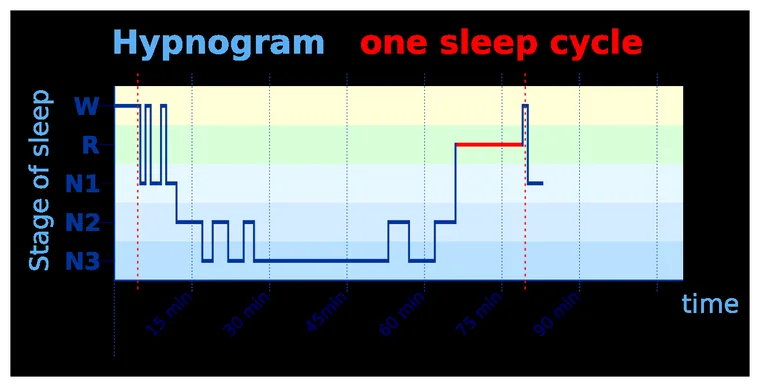
The simplest way to record yourself sleeping is a phone app that captures the night's audio and lines it up with your sleep stages, so you can hear snoring, talking, gasping or grinding without a wearable. Look for one that runs offline, keeps recordings private, and lets you scroll to specific moments. SleepTrace does this on an iPhone.
Wanting to record yourself sleeping is a surprisingly common instinct, and usually a smart one. Maybe a partner says you snore, or talk, or moan or make strange noises, or stop breathing. Maybe you sleep alone and simply have no idea what your nights are like. Either way, you cannot observe your own sleep from the inside — and a recording is the closest thing to a witness you can get.
How to record yourself sleeping: why record at all?
Because almost everything interesting about a difficult night happens while you are unconscious. Snoring, the pause-and-gasp of a breathing event, sleep talking, teeth grinding, restlessness — you have no memory of any of it, and a bleary partner's "you made a weird noise" only goes so far. A full overnight sleep study in a lab formalises these signals in the Wikipedia article on polysomnography. A recording turns that black box into something you can actually replay, and it turns "I think I might snore" into "here is exactly when, and how loud."
Your options, honestly compared
There are three broad ways to do it, and they are not equal.
- A plain voice recorder app. Free and simple, but you end up with eight unlabelled hours and no way to find the moments that matter — you would have to scrub through the whole night.
- A wearable (watch or ring). Estimates sleep stages from movement and heart rate, but it does not hear your night, so it misses snoring, gasps and talking entirely.
- A dedicated sleep-audio app on your phone. Records the whole night, then lines the sounds up against your sleep stages so you can jump straight to the snore, the gasp, or the 3am wake-up. (If you are weighing which app to use, our comparison of the best sleep tracking apps covers the realistic options.)
What good looks like
Whatever you choose, a few things separate a useful recording from a frustrating one:
- It maps sound to sleep stage, so you can find events instead of scrubbing hours of silence.
- It runs offline and keeps recordings on the device — your bedroom at night is about as private as data gets.
- It survives the night without needing the screen on, and does not flatten your battery.
- It lets you scroll to a moment and actually listen, rather than just handing you a number.
And a fair expectation-setter: a recording is evidence, not a diagnosis. It can show you that you snore and pause; it cannot tell you it is definitely apnea. But it gives you — and a doctor — something concrete to work from.
A note on privacy — because it is your bedroom
Recording audio all night is intimate data, so it is worth being deliberate about where it goes. The single most important question to ask of any app is whether the recording stays on your device or gets uploaded to someone's servers. On-device processing means the sounds of your night — and anything else the microphone happens to catch — never leave your phone. Look for an app that is explicit about this, that works in airplane mode, and that does not require an account just to record. It is also worth thinking about a shared bedroom: if a partner is in the room, a courtesy heads-up is fair, though in practice a sleep recording is about your own breathing and movement, not surveillance. The point of recording yourself is to learn something useful about your health; it should not come at the cost of handing your most private hours to a company you know nothing about.
Where SleepTrace fits
SleepTrace is built for exactly this: it records a full night of audio on your iPhone, turns it into your sleep stages, and lets you scroll to any moment to hear the snore, the gasp, the talking or the grinding — no wearable, nothing to charge, recordings kept private on the device. If a partner has flagged your snoring, or you just want to finally know, it is the straightforward way to find out.
Frequently asked questions
A phone app that captures the night's audio and lines it up with your sleep timeline. You set the phone on the nightstand, record, and review the sounds the next morning — which is also how apps like SleepTrace work.
Only if the audio leaves your device. The safe design is on-device analysis: the recording is processed on your phone and the raw audio is never uploaded. Check the app's privacy policy before trusting it with a night in your bedroom.
The sounds — snoring, gasping, sleep talking, teeth grinding — plus when they happened across the night. That is far more specific than just knowing you slept poorly, and it is the information a sleep specialist can actually use.
SleepTrace is a wellness app, not a medical device. This article is general information, not medical advice. If your symptoms are frequent, severe or worrying, please talk to a doctor.
Hear your own night. SleepTrace turns a night of audio into your sleep phases, the sounds you made, and how it all trends — no wearable, just the iPhone on your nightstand. Download on the App Store →